
Tailwind CSS for Delphi developers
A beginner's guide to styling MARS web apps.
This tutorial walks a Delphi developer through setting up Tailwind CSS in a MARS-Curiosity web project that renders its pages with WebStencils. No prior front-end experience is assumed: every new term is explained the first time it appears, and every example is taken from the TailwindcssDemo project, which you can build and run while reading.
What you'll need, and what the words mean
- Tailwind CSS — a library of small, reusable style "recipes" (classes such as
text-emerald-600) that you attach directly to HTML tags instead of writing custom CSS rules. - CLI (command-line interface) — a small program you run from a terminal, much like running
dcc32.exeto compile a Delphi project, except this one compiles CSS. - Standalone CLI — a build of the Tailwind CLI that needs no Node.js or npm: a single
.exe, which is what most Delphi developers want. - Static files — plain files (CSS, JS, images) served exactly as they are on disk, with no server-side processing.
- WebStencils — Embarcadero's server-side template engine. It merges data from Pascal objects into
.htmltemplates, much as a Delphi report template merges data into a printed document. - Post-build event — a command RAD Studio runs automatically right after a successful compile.
Why combine Tailwind with MARS and WebStencils
MARS is the REST/HTTP framework that receives the browser's request and calls a Pascal method. That method returns HTML by way of a small helper class, TWebRenderService, which uses WebStencils to fill placeholders such as @page.Title with real data. Tailwind's job is purely visual: it supplies ready-made CSS classes so the result looks finished without hand-writing stylesheets.
Reference material
Embarcadero has an official video and demo project covering this same combination:
- Video: WebStencils + TailwindCSS
- Demo project: Embarcadero/WebStencilsDemos (TailwindCSSBased)
Installing the Tailwind standalone CLI
Tailwind's CLI is normally installed through npm. Because most Delphi machines have no Node.js set up, use the standalone build instead — a single executable with no dependencies.
Open the releases page.
Download the executable for your platform (for example
tailwindcss-windows-x64.exe).Rename it to
tailwindcss.exeand put it in your project, next to the other build tools — think of it like copying a.dllnext to your executable. The demo's committedwww/css/output.csswas generated with v4.3.3; use that version if you want a byte-comparable rebuild. The CLI is not committed to the repository — it is a ~107 MB binary, over GitHub's per-file limit — so this download is a one-time setup step.TIP
The Tailwind CLI is only needed to change the styling. The compiled stylesheet ships with the demo, so you can build and run it without downloading anything.
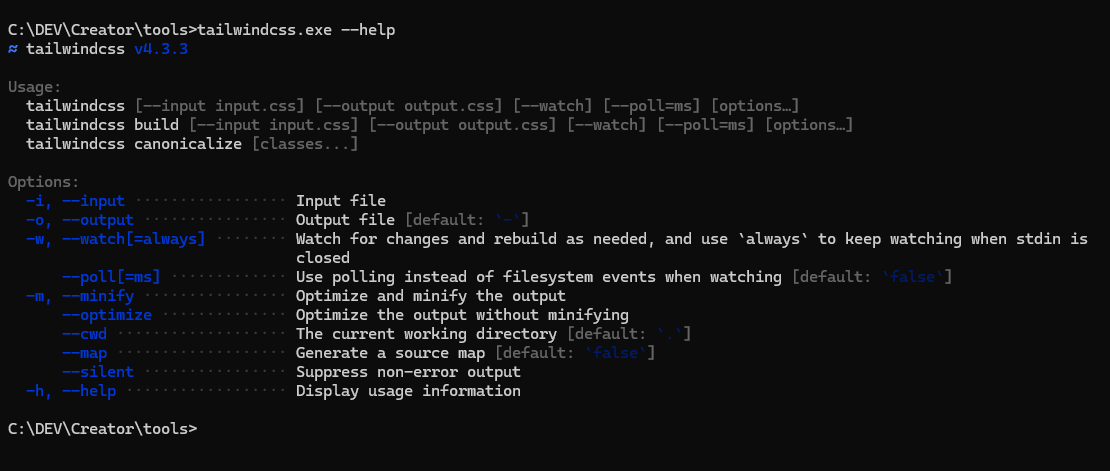
Open a command prompt in that folder and run:
tailwindcss.exe --helpIf a list of commands appears, the CLI works. There is no installer and no setup wizard.
Setting up the folder structure
Create these folders alongside the Delphi project. This is the layout TailwindcssDemo uses:
Demos/TailwindcssDemo/
  src/
    input.css            <- you write this
  www/                   <- served as /static/... by MARS
    css/
      output.css         <- Tailwind generates this
    js/
      htmx.min.js
  templates/
    layouts/
      application.html
    partials/
      sidebar.html
      topbar.html
    pages/
      users/
        list.html
        detail.html
  bin/                   <- the compiled server lives here
Two details are worth pausing on, because they are what make the layout portable:
wwwandtemplatessit next tobin, and both are located at run time relative to the executable — so the demo works wherever the repository is checked out.- The folder on disk is
www/css, while the URL the browser requests is/static/css— the static resource maps one onto the other.
Your first Tailwind input file
Create src/input.css with a single line:
@import "tailwindcss";This is the equivalent of a uses clause that pulls in an entire library: it tells Tailwind to include its utility classes.
Compiling CSS (the build step)
This works exactly like compiling Delphi code: source in, compiler runs, output the runtime — here, the browser — can consume.
tailwindcss.exe -i src/input.css -o www/css/output.css --config tools/tailwind.config.js --watch| Flag | Meaning |
|---|---|
-i | input file — your Tailwind source |
-o | output file — the compiled CSS the browser loads |
--config | the Tailwind config file to use |
--watch | recompiles automatically every time you save a change |
For a release build, run once with --minify instead of leaving --watch running:
tailwindcss.exe -i src/input.css -o www/css/output.css --config tools/tailwind.config.js --minifyAutomating it with a post-build event
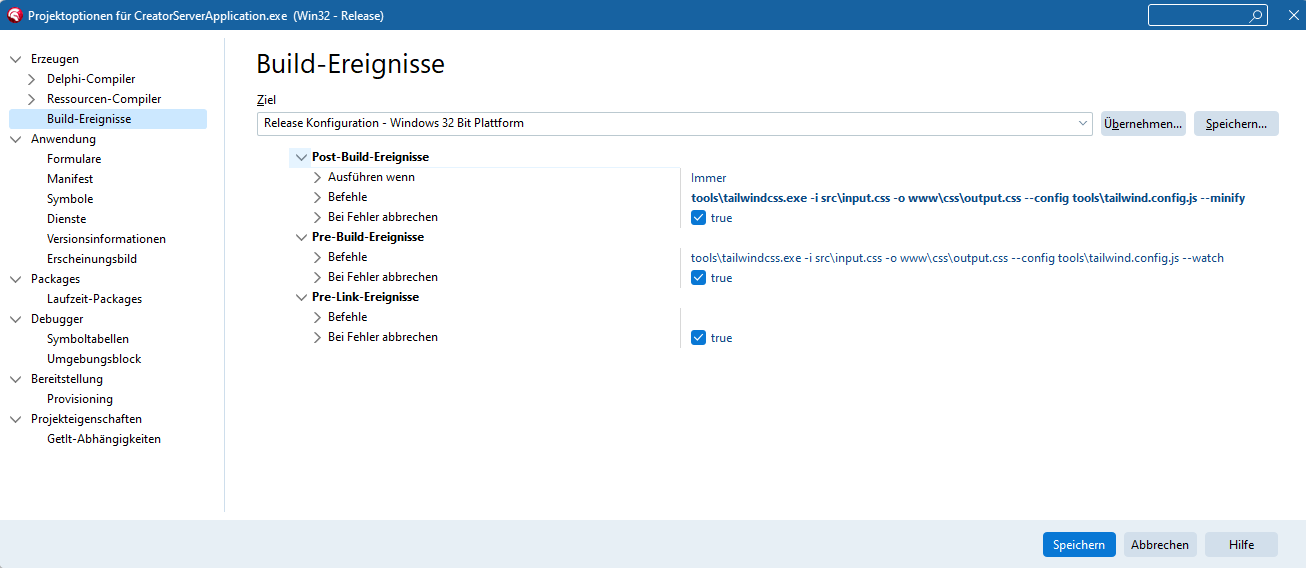
Running the CLI by hand works, but it is easy to forget. RAD Studio can run the command for you after every successful compile:
- Project → Options…
- Building → Build Events → Post-build event
- Enter the
--minifycommand shown above.
TIP
Paths in a build event are resolved relative to the project's working directory — adjust them if your folder layout differs. Use --minify (which exits) rather than --watch (which does not) in a build event, or the build will never finish.
WARNING
TailwindcssDemo ships without these build events, and with www/css/output.css committed, so the demo compiles and runs on a machine that has no Tailwind CLI at all. Add the event to your own project, not to the demo.
Serving static files from MARS
Register a static resource so MARS knows how to serve the compiled CSS and JS. This is the complete unit from the demo:
unit Server.Resources.Web.Static;

interface

uses
  MARS.Core.Attributes,
  MARS.Core.URL,
  MARS.WebServer.Resources;

type
  [Path('static/{*}'),
   RootFolder('{bin}\..\www', True),
   MetaVisible(False)]
  TWebStaticResource = class(TFileSystemResource)
  end;

implementation

uses
  MARS.Core.Registry;

initialization
  MARSRegister(TWebStaticResource);

end.
Three things are happening here:
[Path('static/{*}')]claims every URL beginning with/static/;{*}captures the rest of the path as the file name.[RootFolder('{bin}\..\www', True)]points at the folder to read from.{bin}is the folder holding the executable, so this resolves towwwnext tobin;Trueincludes subfolders.MARSRegister(TWebStaticResource)registers the class with the engine at startup.
The same resource serves www/js/htmx.min.js and www/js/ui.js, so the demo's own JavaScript travels through exactly the mechanism you just registered. See HTML & Templates for the rest of what TFileSystemResource can do, including per-extension content types.
WARNING
MARS resources register themselves once, when the process starts. After adding or changing a resource you must rebuild and restart the server — a running process will not pick up new routes.
Linking the output into your layout
The master layout, templates/layouts/application.html, loads the compiled CSS and htmx:
<!doctype html>
<html lang="en">
<head>
  <meta charset="utf-8">
  <meta name="viewport" content="width=device-width, initial-scale=1">
  <title>@page.Title - MARS TailwindcssDemo</title>
  <link rel="stylesheet" href="@page.BasePath/static/css/output.css">

  <script src="@page.BasePath/static/js/htmx.min.js"></script>
</head>
<body class="min-h-screen bg-slate-50 text-slate-900">
  <div class="min-h-screen lg:flex">
    @Import partials/sidebar.html

    <div class="min-w-0 flex-1">
      @Import partials/topbar.html

      <main class="mx-auto max-w-7xl px-4 py-6 sm:px-6 lg:px-8">
        @Import partials/flash-message.html
        @RenderBody
      </main>
    </div>
  </div>

  <div id="modal"></div>
</body>
</html>@page.BasePathis a property of the page model, so the same template works whatever base path the engine is mounted on.htmx.min.jsadds interactivity — form posts and partial updates — without custom JavaScript.@Importpulls in a reusable partial, much like sharing a frame between Delphi forms.@RenderBodyis where the individual page's content is inserted.
The interactive parts are a licensing decision
Dropdowns, the account menu and the mobile navigation drawer need some JavaScript. The demo implements them in about a hundred lines of plain DOM code (www/js/ui.js), because the obvious off-the-shelf option — Tailwind Plus Elements — is commercially licensed. The next section covers both routes.
Interactive components: two options
Tailwind CSS styles things; it does not open a drawer or toggle a menu. For that you need either a component library or a little JavaScript of your own. The two routes are genuinely different, and the choice has a licence attached — so it is worth making deliberately.
Option A — plain Tailwind plus a little JavaScript (what the demo ships)
www/js/ui.js is roughly a hundred lines with no dependencies. It listens for clicks on elements carrying data attributes and flips the hidden property:
document.addEventListener('click', function (event) {
  if (hit(event.target, '[data-sidebar-open]'))  { openSidebar();  return; }
  if (hit(event.target, '[data-sidebar-close]')) { closeSidebar(); return; }

  var button = hit(event.target, '[data-menu-button]');
  if (button) { toggleMenu(button); return; }

  if (!hit(event.target, '[data-menu-panel]')) closeMenus(null);   // click-away
});
The markup side is ordinary Tailwind. The sidebar is one element that is a drawer on small screens and a static column from xl up, and the topbar button points at it:
<!-- templates/partials/sidebar.html -->
<div id="mobile-sidebar" hidden class="relative z-50 xl:hidden">
  <div data-sidebar-close class="fixed inset-0 bg-gray-900/80"></div>
  ...
</div>

<!-- templates/partials/topbar.html -->
<button type="button" data-sidebar-open aria-controls="mobile-sidebar" class="... xl:hidden">
  <span class="sr-only">Open navigation</span>
  ...
</button>
Two details make this work without any framework:
- The drawer uses the
hiddenattribute, not ahiddenclass, so JavaScript can toggle it withpanel.hidden = falsewhile Tailwind'sxl:hiddenstill removes it entirely on large screens. - The main content is inset by the sidebar's width at that same breakpoint —
xl:pl-72inapplication.html— because the desktop sidebar isxl:fixedand therefore out of the normal flow.
Escape closes both the drawer and the menu, and growing the window past xl resets the drawer. No licence, works on a phone, and it is small enough to read in one sitting.
Option B — Tailwind Plus Elements
Tailwind Plus sells the Elements library along with the UI Blocks markup it is designed for. It gives you custom elements — <el-dialog>, <el-dropdown>, <el-disclosure> and friends — plus a declarative command / commandfor attribute pair, so the same behaviour needs no JavaScript of your own, and adds transition states you would otherwise hand-write.
It is loaded as a module:
<script src="https://cdn.jsdelivr.net/npm/@tailwindplus/elements@1" type="module"></script>Elements and the UI Blocks markup are both commercially licensed
This is not part of open-source Tailwind CSS. Using Elements — or shipping the Tailwind Plus UI Blocks markup it pairs with — requires a paid Tailwind Plus licence, and neither may be redistributed in a public repository. Read the licence before you commit either into a project other people can clone. That constraint is exactly why this demo went the Option A route.
The two are not drop-in replacements for each other: Elements keys off its own element names and command attributes, while Option A keys off data-* attributes and the hidden property. Adding the script to Option A's markup does nothing, and vice versa. Pick one per project.
Choosing Tailwind classes from Delphi
Some classes have to change according to server-side logic — highlighting the current navigation entry, for instance. The demo does this with TWebPageInfo in Server.Web.Models.pas:
TWebPageInfo = class
private
  FTitle: string;
  FError: string;
  FSuccess: string;
  FBasePath: string;
  FActiveNav: string;
public
  constructor Create; overload;
  constructor Create(const ATitle: string; const AActiveNav: string = ''); overload;
  property Title: string read FTitle write FTitle;
  property Error: string read FError write FError;
  property Success: string read FSuccess write FSuccess;
  property BasePath: string read FBasePath write FBasePath;
  property ActiveNav: string read FActiveNav write FActiveNav;
  function HasError: Boolean;
  function HasSuccess: Boolean;
  function NavStateClass(const AKey: string): string;
  function NavIconStateClass(const AKey: string): string;
end;HasError/HasSuccessreturnTruewhen a flash message is set, so the template can decide whether to render a notification banner.NavStateClass(AKey)comparesAKey(say,'users') with the page'sActiveNavand returns the classes for an active or an inactive link.NavIconStateClass(AKey)does the same for the icon beside each link.
The implementation is deliberately dull — the interesting part is that the class names are data:
const
  NAV_ACTIVE_CLASS = 'bg-gray-100 text-emerald-600 dark:bg-white/5 dark:text-white';
  NAV_INACTIVE_CLASS = 'text-gray-700 hover:bg-gray-100 hover:text-emerald-600 '
    + 'dark:text-gray-400 dark:hover:bg-white/5 dark:hover:text-white';

function TWebPageInfo.NavStateClass(const AKey: string): string;
begin
  if SameText(AKey, FActiveNav) then
    Result := NAV_ACTIVE_CLASS
  else
    Result := NAV_INACTIVE_CLASS;
end;
A page sets its active section when it builds the model — in Server.Resources.Web.Users.pas:
LPage := TWebPageInfo.Create('Users', 'users');The first argument becomes the browser tab title; the second tells the navigation which entry to highlight while this page is on screen.
Two WebStencils rules worth learning early
These two catch nearly every newcomer.
A boolean property is read directly, not wrapped.
<!-- Wrong: string conversion makes True/False unreliable -->
@if (@user.IS_ACTIVE) { ... }

<!-- Right: reference the property, with no inner @ -->
@if user.Is_Active { ... }
A method call with arguments needs the expression form @( … ).
<!-- Wrong: renders as literal text on the page -->
@page.NavStateClass('home')

<!-- Right -->
@(page.NavStateClass('home'))| What you want | Wrong | Right |
|---|---|---|
| test a boolean property | @if (@user.IS_ACTIVE) | @if user.Is_Active { } |
| call a method with an argument | @page.NavStateClass('home') | @(page.NavStateClass('home')) |
Putting it together: the sidebar
A trimmed excerpt from the demo's sidebar.html, with both rules applied:
<a href="@page.BasePath/app/home"
   class="group flex gap-x-3 rounded-md p-2 text-sm/6 font-semibold @(page.NavStateClass('home'))">
  <svg xmlns="http://www.w3.org/2000/svg" fill="none" viewBox="0 0 24 24"
       stroke-width="1.5" stroke="currentColor"
       class="size-6 shrink-0 @(page.NavIconStateClass('home'))">
    <path stroke-linecap="round" stroke-linejoin="round"
          d="m2.25 12 8.954-8.955c.44-.439 1.152-.439 1.591 0L21.75 12M4.5 9.75v10.125..." />
  </svg>
  Home
</a>

<a href="@page.BasePath/users"
   class="group flex gap-x-3 rounded-md p-2 text-sm/6 font-semibold @(page.NavStateClass('users'))">
  <svg ... class="size-6 shrink-0 @(page.NavIconStateClass('users'))">...</svg>
  <span class="truncate">Users</span>
</a>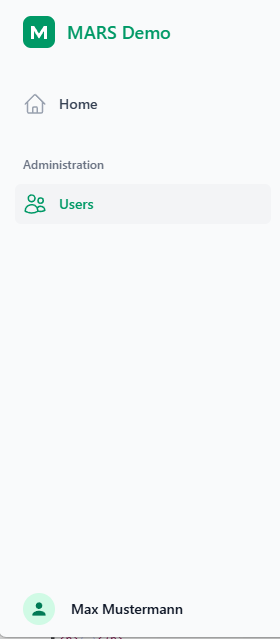
Day-to-day workflow
- Keep
tailwindcss.exe … --watchrunning while you edit templates. - Edit Pascal code as needed.
- Build and run the project.
- Restart the server so new routes and resources take effect.
- Refresh the browser.
Troubleshooting
| Symptom | Likely cause |
|---|---|
| classes have no effect | the output.css link path is wrong, or the CLI never ran — check the file's timestamp |
| the active-navigation highlight never changes | @page.NavStateClass(...) was used instead of @(page.NavStateClass(...)) |
an @if on a boolean is always wrong | the property was wrapped as @user.PROP instead of referenced as user.Prop |
No implementation found for http method GET | the [Path(...)] attribute does not match the URL the template requests |
| the CSS looks stale after a rebuild | the build event's paths are wrong, or tailwindcss.exe is not reachable from the working directory |
| a dropdown or the mobile drawer does nothing | www/js/ui.js did not load — check the /static/js/ui.js request in the browser's network tab |
| a class used only from Pascal or JavaScript has no effect | Tailwind never saw it: add that file to content in tools/tailwind.config.js and rebuild |
Further reading
- HTML & Templates — WebStencils, htmx and static files in MARS
- Authentication (JWT) — the token flow the demo's login builds on
- WebStencils + TailwindCSS (video)
- Embarcadero/WebStencilsDemos
- Tailwind CLI releases