
Dialogs & Bottom Sheets
Modals (unit FMXER.Modals) shows dialogs and bottom sheets over the screen, the counterparts of the Flutter showDialog (AlertDialog) and showModalBottomSheet:
| Confirm | Choose |
|---|---|
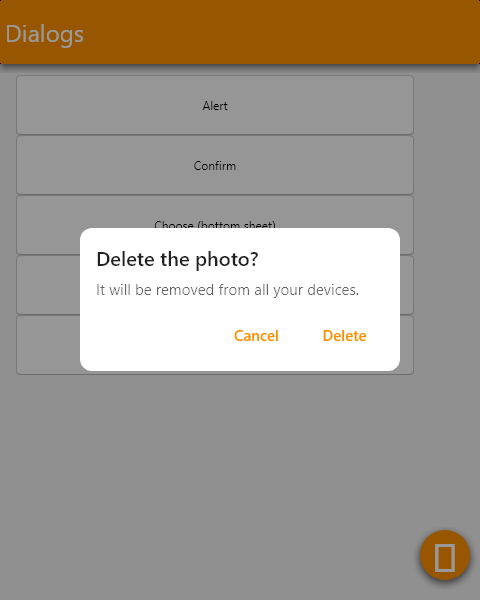 | 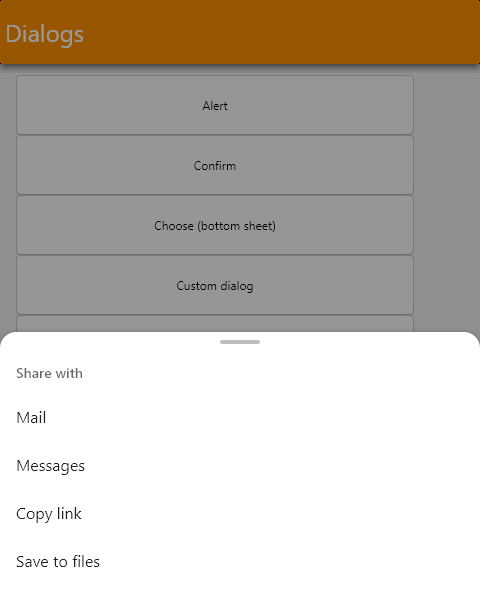 |
They use the TFrameStand stand gallery: the dialog stand, a white card in the middle over a dimmed background that fades in and rises, and the bottomsheet stand, a sheet with a handle that slides up from the bottom. The light version of both stands is built into FMXER.Modals, so there is no style file to deploy. The dialogs are TFrameStand dialogs shown with ShowModal, so they do not block: the result arrives in a closure. Several can be open at once.
How a dialog closes:
- a button of the dialog sets its result;
- a tap on the dimmed background, Back (Android) and Esc cancel the dialog on top (
mrCancel), before the navigator closes a route (back handlers).
Since v.1.7
FMXER.Modals is new in v.1.7 and needs TFrameStand v.2.3 or later (ShowModal, the stand gallery). The lib\TFrameStand submodule is v.2.4.
Alert and Confirm
Modals.Alert('Saved', 'The document has been saved.');

Modals.Confirm('Delete the photo?', 'It will be removed from all your devices.'
, procedure (AOk: Boolean)
  begin
    if AOk then
      DeletePhoto;
  end
, 'Delete'); // the OK button, default 'OK'; the Cancel button: 5th parameter, default 'Cancel'| Method | Description |
|---|---|
Alert(ATitle, AMessage; AThen: TProc = nil; AOkText = 'OK') | a message with one button; AThen runs when the alert is closed (by the button, a tap outside or Back) |
Confirm(ATitle, AMessage, AResultProc: TProc<Boolean>; AOkText = 'OK'; ACancelText = 'Cancel') | True for OK; False for Cancel, a tap outside, Back, Esc |
The card is 320 wide and as high as its content. The content is a TAlertFrame: title, message and the text buttons in TAppColors.PrimaryColor.
Choose
Modals.Choose('Share with', ['Mail', 'Messages', 'Copy link']
, procedure (AIndex: Integer)
  begin
    if AIndex >= 0 then
      Share(AIndex);
  end
);
Choose(ATitle, AChoices, AResultProc: TProc<Integer>) shows the choices as a list in a bottom sheet. AResultProc gets the index of the choice tapped, or -1 when the sheet is dismissed. An empty title shows no title. The sheet is as high as its content, up to 70% of the screen: beyond that, the list scrolls.
Your own dialogs and sheets
ShowDialog<T> and ShowBottomSheet<T> show any frame, an FMXER element too. The frame closes the dialog by setting ModalResult on its info. The info is the value the methods return; a frame of your own can also receive it in a [SubjectInfo] field, see Writing Your Own Elements.
var
  LDialog: TFrameInfo<TColumnFrame>;
  LName: string;
begin
  LDialog := Modals.ShowDialog<TColumnFrame>(
    procedure (Content: TColumnFrame)
    begin
      Content
      .AddFrame<TEditFrame>(60
      , procedure (Edit: TEditFrame)
        begin
          Edit.SetCaption('Your name').OnChangeProc :=
            procedure (ATracking: Boolean)
            begin
              LName := Edit.GetText;
            end;
        end
      )
      .AddFrame<TButtonFrame>(44
      , procedure (Button: TButtonFrame)
        begin
          Button.SetText('OK').SetOnClickProc(
            procedure
            begin
              LDialog.ModalResult := mrOk;   // closes the dialog
            end
          );
        end
      );
    end
  , procedure (Content: TColumnFrame; AResult: TModalResult)
    begin
      if AResult = mrOk then
        Greet(LName);
    end
  , 300, 150);   // the size of the card; 0: the size of the stand (320 x 240)
end;| Method | Description |
|---|---|
ShowDialog<T: TFrame>(AConfigProc = nil; AResultProc: TProc<T, TModalResult> = nil; AWidth = 0; AHeight = 0): TFrameInfo<T> | a T in the card of the dialog stand. The card is 32 wider and higher than the content area (16 margins) |
ShowBottomSheet<T: TFrame>(AConfigProc = nil; AResultProc = nil; AHeight = 0): TFrameInfo<T> | a T in the sheet of the bottomsheet stand (360 high by default; the handle takes 20, the margins 16 on the sides and at the bottom) |
AResultProc is called once, after the hide animation and before the frame is freed, so it can still read the frame. Any ModalResult other than mrNone closes the dialog, and the first one set wins.
The stands are white: on them, write in dark colors. TTextFrame writes in TAppColors.PrimaryTextColor, which is white by default, so call SetFontColor.
Other members
| Member | Description |
|---|---|
CancelTop: Boolean | closes the dialog or sheet on top with mrCancel; False when none is open |
GetOpenCount: Integer | dialogs and sheets open |
SetParent(AParent): TModals | where they are shown. Default: the safe area layout of the navigator (or the form of its FormStand), else Application.MainForm |
FrameStand: TFrameStand, Stands: TStyleBook | the stand component and its style book, with the dialog and bottomsheet stands: change them here, e.g. the fill of the card |
TModals.ReleaseInstance | frees the singleton and the dialogs still open (also done at finalization) |
TAlertFrame
Unit FMXER.AlertFrame. The content of Alert and Confirm, also usable with ShowDialog<TAlertFrame>.
| Member | Description |
|---|---|
SetTitle(ATitle), SetMessage(AMessage) | hidden when empty |
SetOkText(AText) | the OK button (mrOk) |
SetCancelText(AText) | the Cancel button (mrCancel), hidden when empty |
GetPreferredHeight | the height of the content, for the card |
TitleLabel, MessageLabel, OkLabel, CancelLabel, ButtonsLayout | the controls |
TChoicesFrame
Unit FMXER.ChoicesFrame. The content of Choose.
| Member | Description |
|---|---|
SetTitle(ATitle), SetChoices(TArray<string>) | |
Chosen: Integer | the index of the choice tapped, -1 for none |
Items: TList<TSkLabel>, ItemHeight (48) | the items |
GetPreferredHeight | the height of the content, for the sheet |